|
|
Home > Display your messages in minutes
| | |
|
Display your messages in minutes with GUD-10K / CUE-Y
Introduction
This is a quick guide to display your messages in minutes using GUD-10K / CUE-Y and RS-232 DE-9 to 6/7 pin Kit.
What is GUD-10K / CUE-Y
GUD-10K / CUE-Y is Windows® based software used to send messages to Noritake VFD Module in minutes.
Eliminate the hassle of going through pages of technical specification by taking advantage of GUD-10K / CUE-Y's button of commands. Applicable commands are laid out into buttons, allowing user to click on the button and visually see command execute on to the VFD Module.
GUD-10K / CUE-Y can also record your action and save the commands in C and/or Assembly programming languages, Hexadecimal, text, and in GUD-10K / CUE-Y native format.
|
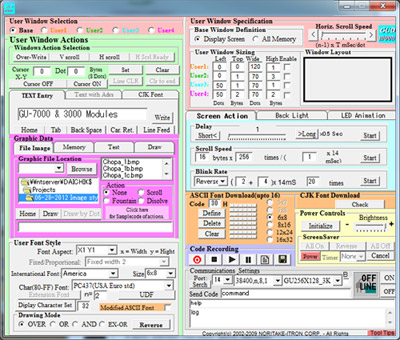
GUD-10K (For GU-3000 Series and GU-7000 Series)
|
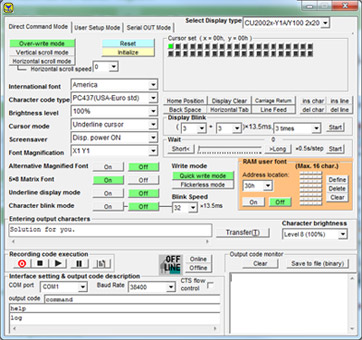
CUE-Y (For CU-Y Series)
|
Requirements
Necessary hardware to follow this guide:
Necessary software to follow this guide:
How to set up
- Connect the VFD Module with the following kit
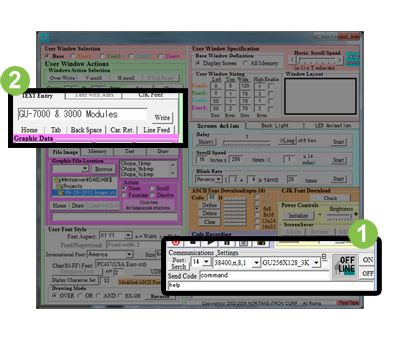
For GU-3000 Series and GU-7000 Series
Run GUD-10K
- Select the port and click "ON" button.
- Click "Write" button.
|
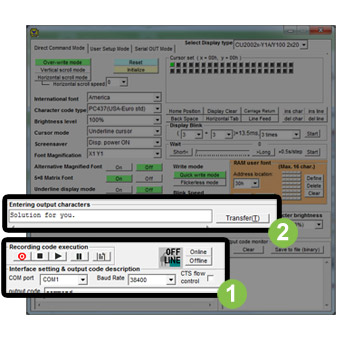
For CU-Y Series
Run CUE-Y
- Select the port and click "ONLINE" button.
- Click "Transfer" button.
|
| |
| | |
|
|